
The quick path
Download a release
Official releases include everything needed to run the compiler. Pick a monthly release for a stable build, or a nightly when you need the newest features.
Choose your platform
A few things before you begin
Showing instructions for Windows.
Windows
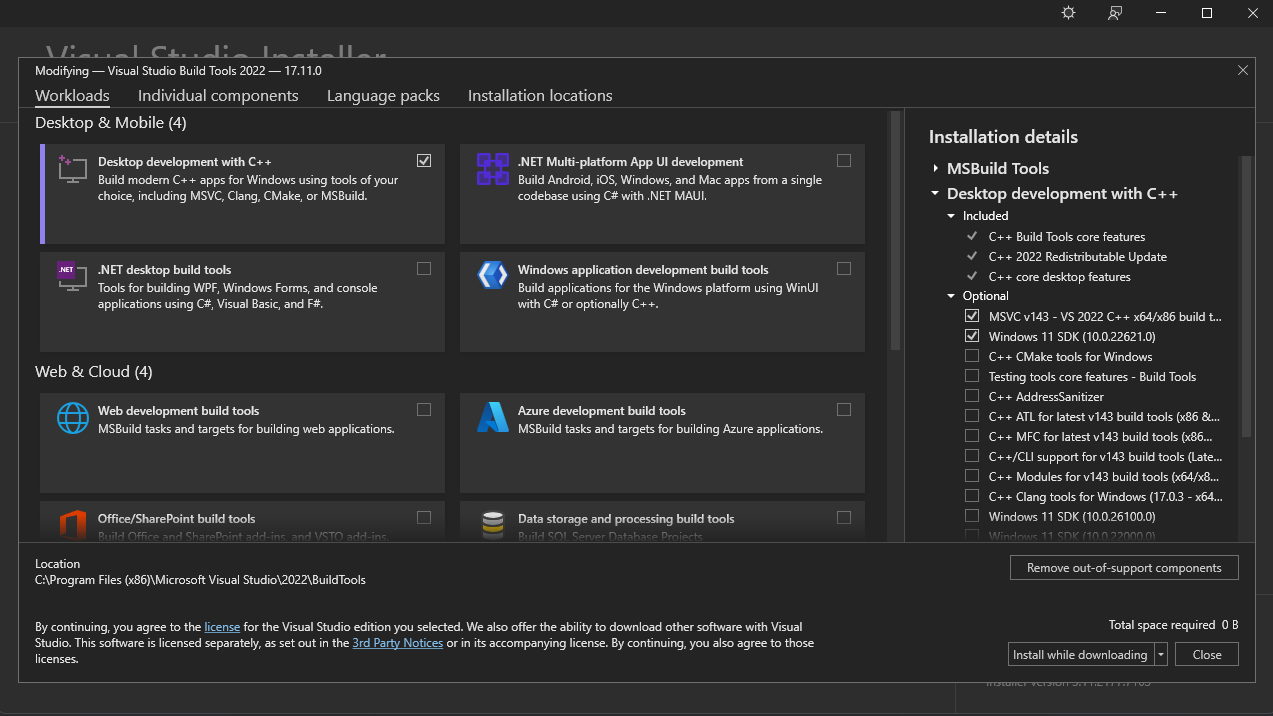
Odin on Windows uses the Microsoft C++ toolchain and Windows SDK for linking.
- Install Build Tools for Visual Studio. In the installer, select Desktop development with C++, including MSVC and the Windows SDK. Get the Build Tools.
- Use a developer command prompt. Open
x64 Native Tools Command Prompt for VS20xxfrom the Start menu, or runvcvarsall.bat x64from a blankcmdsession. - Unzip Odin and run it. Optionally add the Odin directory to
PATHsoodin.exeis available everywhere.
Want the smallest possible Build Tools install?
A third-party script can install only the required components.
macOS
Install Apple’s command-line tools before using a release or building Odin.
- Install Xcode command-line tools.
xcode-select --installIf the command is unavailable, install Xcode from the App Store first.
- Unzip Odin and run it. Add the Odin folder to your shell’s path, or symlink
odininto a directory already on your path.
macOS release notes
The release does not include wasm-ld. Install it separately with brew install lld if you need to compile to WASM.
For Zsh, add Odin with echo 'export PATH="/path/to/Odin/folder:$PATH"' >> ~/.zshrc. Keep the executable next to its base, core, and vendor folders, or set ODIN_ROOT.
If macOS quarantines the executable, try xattr -d com.apple.quarantine <path_to_odin_executable>.
Linux & Unix
Odin relies on Clang for linking. Linux x86-64/AMD64 and ARM64 are supported, alongside FreeBSD, NetBSD, and OpenBSD.
- Install Clang.
sudo apt install clangOn Fedora, use
sudo dnf install clang. - Unzip Odin and run it. Add the Odin folder to your shell path, or symlink the
odinbinary into a directory already on it.
Unix release notes
For Bash, use echo 'export PATH="/path/to/Odin/folder:$PATH"' >> ~/.bashrc. The compiler needs its base, core, and vendor folders nearby unless ODIN_ROOT is set.
For contributors and tinkerers
Build from source
All build paths clone the same repository. Your platform tab keeps the prerequisite steps close at hand.
Clone Odin
git clone https://github.com/odin-lang/Odin
cd Odin
git lfs installOptionally use git checkout dev-YYYY-MM to select an official release branch.
Build it
build.bat releasebrew install llvm
make release-nativemake release-nativemacOS and Unix support LLVM 17 through 22. Ensure llvm-config and clang are on your PATH.
Source build notes and updating
macOS + WASM
Install the linker with brew install lld to compile for WASM. To choose a specific LLVM installation, use LLVM_CONFIG=/path/to/llvm-config make release-native.
Linux packages
Some distributions split LLVM into packages, including an llvm-devel package. On older distributions, see apt.llvm.org or the Fedora LLVM snapshots.
Updating
In your Odin directory, run git pull, then git lfs pull if needed, and run the platform build command again.
atomic.h on Unix
If you see an atomic header error, run clang++ -v, note the selected GCC version, then install its C++ development package—often libstdc++-VERSION-dev. See issue #3376 for help.
Prefer a package manager?
Check community packages
Third parties maintain many package-manager builds. Their freshness and configuration can vary, so use their issue trackers for package-specific support.
View Odin on RepologyNeed a hand?
Got stuck?
Ask the community on Discord, or open an issue or discussion on GitHub.
Installation complete
What next?
Learn the language’s design and basic workflow in the Odin Overview.